AIVA Connect Console
When AIVA hands off, your team picks up with the whole conversation
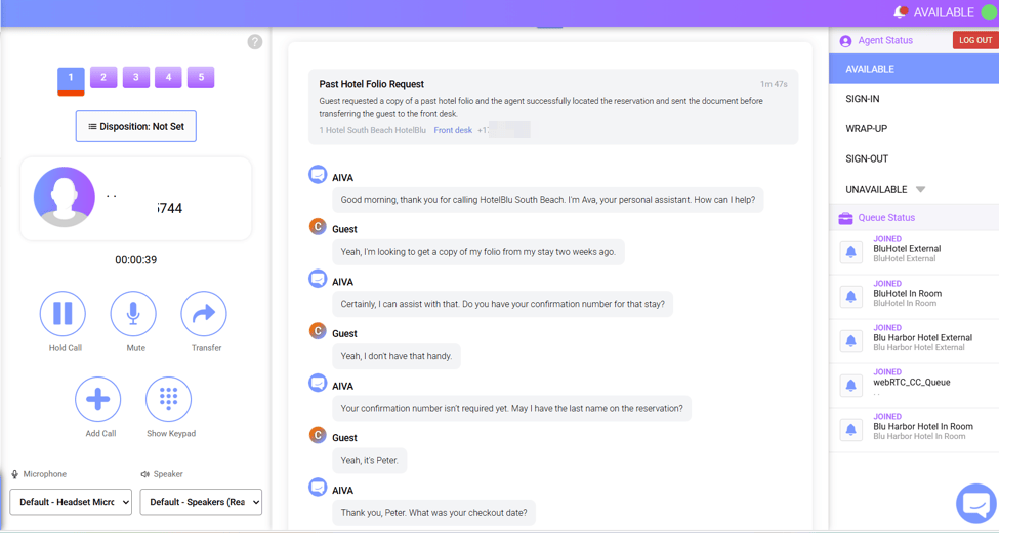
AIVA Connect Console is the softphone your staff answer from. It runs in the browser with nothing to install. When AIVA passes a call to a person, the transcript arrives with it, so nobody asks the caller to start over.
Already evaluating the AI receptionist? Console is where your people take the calls AIVA sends them.
AIVA Connect Console
A softphone that knows what AIVA already heard
- Browser-based
- Single sign-on
- AIVA handoff
AIVA answers routine calls and completes them by itself. When a caller needs a person, AIVA routes the call to the right team. Console is where that team answers, with the full transcript on screen.
Console is a complete business phone. It runs in any modern browser over WebRTC, signs in through your identity provider and works across devices with zero install. Because BluIP carries the call, Console knows which line or room is calling before anyone says hello.
What your team does in it
Every call tool your staff need, plus the context they never had
Associates handle calls the way they always have. The difference is they start with the caller's request on screen instead of a blank greeting.
Pick up with the transcript
Read what the caller told AIVA before you say a word.
Transfer any way you need
Blind or attended transfers, plus add-to-conference.
See who's free before you transfer
Busy lamp field, hunt group pickup, and personal, group and enterprise directories.
Set it up your way
Call forwarding, do not disturb, auto answer and auto hold.
Built for the people who run each department
AIVA sends each call to the team that can solve it
Put a Console seat in each department that takes calls. AIVA identifies what the caller needs and routes to the right seat, so the spa gets spa calls and reservations gets booking calls.
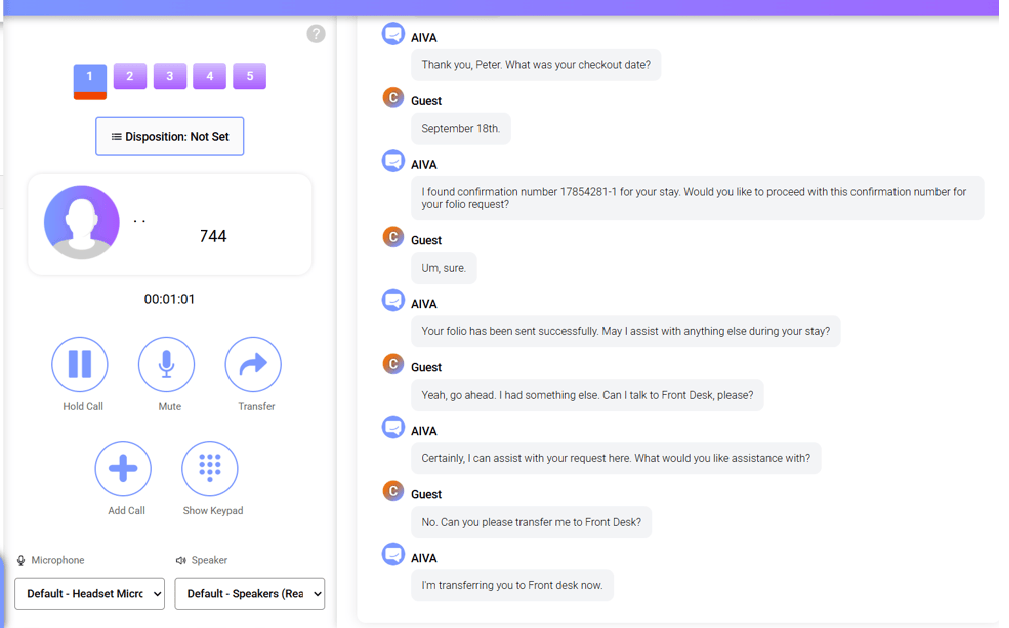
Every handoff carries the transcript. Staff spend their time resolving the request, not re-asking for it.
How a handoff works: Front desk
- 1AIVA answers and handles what it can
- 2AIVA routes the call to the front desk seat
- 3Staff pick up with the transcript and transfer if needed
One Console, four ways to run it
Start with a phone. Grow into a contact center
Every edition includes the AIVA handoff transcript, transfers, conferencing, directories, SSO and zero install. Add Contact Center and Supervisor seats as your operation grows.
Edition
Softphone
For
Any team taking calls
Adds
Hunt group pickup, call settings, AIVA handoff
Edition
Hospitality
For
Hotel front desk and operators
Adds
PMS guest identification; Jazzware room status, DND and wake-up calls; BLF
Edition
Contact Center Agent
For
Associates in queues
Adds
ACD call distribution, queue join and unjoin, disposition codes, callback, real-time queue stats
Edition
Contact Center Supervisor
For
Team leads
Adds
Everything agents have, plus supervisor monitor, barge-in and advanced reporting (Akixi)
Call recording, voicemail and voicemail transcription are available on select plans and managed in the BluIP portal.
AIVA Connect platform
Studio decides what AIVA does. Console is where your people take over
Teams build AIVA's workflows in Studio, including which requests AIVA completes and where it hands off. Console is the phone those handoffs land on.
Both run on the same BluIP platform and the same voice network. When volume grows, Contact Center and Supervisor seats run in the same Console, with the same transcript attached.
Next step
See a handoff land in Console with the transcript
Book a demo. We'll call AIVA live, hand the call to a Console seat and show your team picking up with the transcript.